Interval Scan
An interval scan is QuestDB's optimized method for querying time ranges. Instead of scanning all rows, QuestDB uses binary search on the designated timestamp column to jump directly to relevant data.
For how interval scans work and their performance impact, see Designated timestamp: Performance impact.
For complex multi-interval patterns, see TICK interval syntax.
How it looks
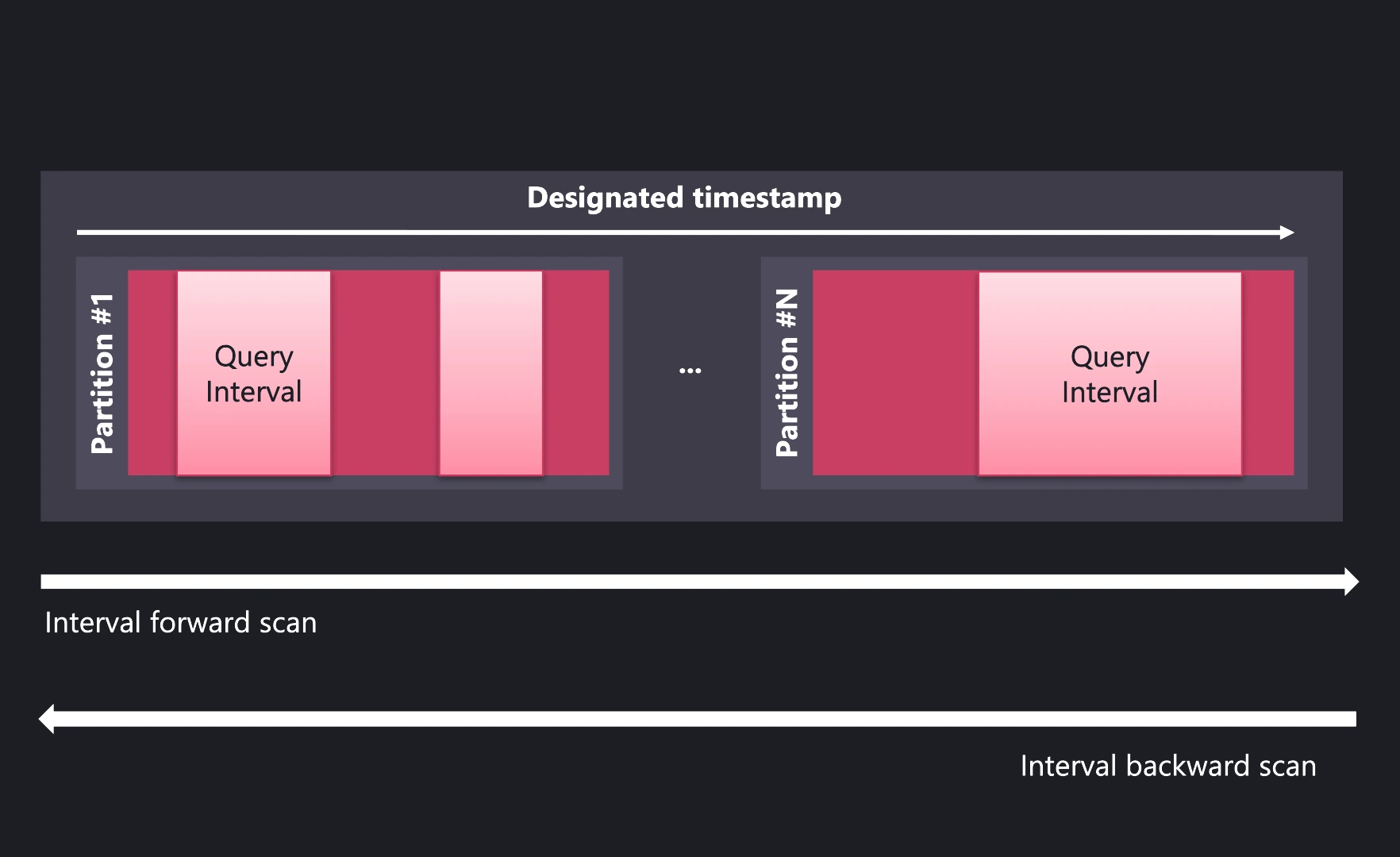
The query engine:
- Prunes partitions outside the time range
- Binary searches within relevant partitions to find exact row boundaries
- Reads only rows within those boundaries
Verifying interval scan with EXPLAIN
Use EXPLAIN to confirm a query uses interval scan:
EXPLAIN SELECT * FROM trades
WHERE timestamp IN '2024-01-20';
Good - Interval scan is being used:
| QUERY PLAN                                                    |
|---------------------------------------------------------------|
| DataFrame                                                     |
|     Row forward scan                                          |
|     Interval forward scan on: trades                          |
|       intervals: [("2024-01-20T00:00:00.000000Z",             |
|                    "2024-01-20T23:59:59.999999Z")]            |
Not optimal - Full scan with async filter:
| QUERY PLAN                                                    |
|---------------------------------------------------------------|
| Async Filter                                                  |
|     workers: 4                                                |
|     filter: timestamp IN '2024-01-20'                         |
|     DataFrame                                                 |
|         Full scan on: trades                                  |
If you see Async Filter or Full scan instead of Interval forward scan,
the query is not using the designated timestamp optimization.
Equivalent query forms
These queries all produce the same interval scan plan:
SELECT * FROM trades WHERE timestamp IN '2024-01-20';
SELECT * FROM trades
WHERE timestamp BETWEEN '2024-01-20T00:00:00.000000Z'
                    AND '2024-01-20T23:59:59.999999Z';
SELECT * FROM trades
WHERE timestamp >= '2024-01-20T00:00:00.000000Z'
  AND timestamp <= '2024-01-20T23:59:59.999999Z';
All three produce:
Interval forward scan on: trades
  intervals: [("2024-01-20T00:00:00.000000Z","2024-01-20T23:59:59.999999Z")]
Use whichever form is most readable for your use case. IN with partial
timestamps is typically the most concise.
Multiple intervals
For multiple time ranges, use TICK syntax:
EXPLAIN SELECT * FROM trades
WHERE timestamp IN '2024-01-[15,16,17]';
Interval forward scan on: trades
  intervals: [("2024-01-15T00:00:00.000000Z","2024-01-15T23:59:59.999999Z"),
              ("2024-01-16T00:00:00.000000Z","2024-01-16T23:59:59.999999Z"),
              ("2024-01-17T00:00:00.000000Z","2024-01-17T23:59:59.999999Z")]
Each interval uses binary search independently—complex patterns perform as fast as simple queries.
Edge cases
Tables without designated timestamp
Tables without a designated timestamp cannot use interval scan. Queries fall back to full table scan with async filter.
To enable interval scan, recreate the table with a designated timestamp:
CREATE TABLE trades_new (
    ts TIMESTAMP,
    symbol SYMBOL,
    price DOUBLE
) TIMESTAMP(ts) PARTITION BY DAY;

INSERT INTO trades_new SELECT * FROM trades_old ORDER BY ts;
Declaring timestamp on query results
For subqueries or tables without a designated timestamp, you can declare one
using TIMESTAMP(columnName):
EXPLAIN SELECT * FROM trades_nodts TIMESTAMP(ts)
WHERE ts IN '2024-01-20';
This enables interval scan on the result.
TIMESTAMP(columnName) only works if the data is actually ordered by that
column. If the data is not in timestamp order, query results will be incorrect.
For unordered data, add ORDER BY first:
SELECT * FROM (SELECT * FROM unordered_table ORDER BY ts) TIMESTAMP(ts)
WHERE ts IN '2024-01-20';
Subqueries lose designated timestamp
Subquery results don't inherit the designated timestamp from the source table:
-- This does NOT use interval scan on the subquery result:
SELECT * FROM (SELECT * FROM trades WHERE symbol = 'BTC-USD')
WHERE timestamp IN '2024-01-20';
To restore interval scan, explicitly declare the timestamp:
-- This uses interval scan:
SELECT * FROM (SELECT * FROM trades WHERE symbol = 'BTC-USD') TIMESTAMP(timestamp)
WHERE timestamp IN '2024-01-20';
See Designated timestamp: Troubleshooting for more scenarios where designated timestamp is lost.
See also
- Designated timestamp — Why interval scan works
- TICK intervals — Complex multi-interval patterns
- EXPLAIN — Query plan analysis