Designated timestamp
Every table in QuestDB should have a designated timestamp. This column defines the time axis for your data and unlocks QuestDB's core time-series capabilities including partitioning, time-series joins, and optimized interval scans.
Without a designated timestamp, a table behaves like a generic append-only store—you lose partitioning, efficient time-range queries, and most time-series SQL features.
- The designated timestamp column defines your table's time axis
- Data is physically sorted by this column, enabling sub-millisecond time-range queries
- Enables: partitioning, SAMPLE BY, LATEST ON, ASOF JOIN, TTL, deduplication, replication
- Constraints: cannot be NULL, cannot be changed after creation, cannot be updated
- Without it: no partitioning, time queries must load all data into RAM
Why designated timestamp exists
Traditional databases store rows in insertion order or by primary key. When you query "show me the last 5 minutes of data," the database must scan the entire table to find matching rows—even if that's 0.001% of your data.
For time-series workloads, this is catastrophically inefficient. Consider a table with 1 billion rows spanning 30 days. A query for "last hour" should read ~1.4 million rows, not 1 billion.
QuestDB solves this with the designated timestamp:
| Problem | Solution |
|---|---|
| Data scattered across disk | Data stored physically sorted by timestamp |
| Must scan entire table for time queries | Binary search jumps directly to relevant rows |
| Can't skip irrelevant data | Partition pruning skips entire time ranges |
| Time-series operations require sorting | Data is pre-sorted, no runtime cost |
The designated timestamp is not just metadata—it fundamentally changes how QuestDB stores and queries your data.
Performance impact
QuestDB's query engine leverages the designated timestamp aggressively:
- Timestamp predicates execute first — Before any other filters
- Partition pruning — Entire partitions outside the time range are skipped, reducing I/O
- Binary search within partitions — Finds exact row boundaries without scanning
- Targeted column reads — Only the relevant data frames from other columns are read from disk
The result: most queries with timestamp predicates complete in sub-millisecond time, regardless of total table size. A query for "last hour" on a table with billions of rows performs the same as on a table with thousands—only the matching rows are touched.
Advanced: TICK interval syntax
For complex temporal patterns, use TICK syntax to generate multiple optimized interval scans from a single expression:
-- NYSE trading hours on workdays for January (22 intervals, one query)
SELECT * FROM trades
WHERE ts IN '2024-01-[01..31]T09:30@America/New_York#workday;6h30m';

-- Last 5 business days at market open
SELECT * FROM trades
WHERE ts IN '[$today-5bd..$today-1bd]T09:30;1h';
Each generated interval uses the same binary search optimization—complex schedules perform as fast as simple time-range queries.
How it works
Physical storage order
When you designate a timestamp column, QuestDB stores all rows sorted by that column's values. New data appends efficiently when it arrives in chronological order. When data arrives out of order, QuestDB rearranges it to maintain timestamp order.
Without designated timestamp:     With designated timestamp:
(stored in insertion order)       (stored sorted by time)

┌─────────────────────────┐      ┌─────────────────────────┐
│ Row 1: 10:05:00         │      │ Row 1: 10:00:00         │
│ Row 2: 10:00:00         │      │ Row 2: 10:01:15         │
│ Row 3: 10:02:30         │      │ Row 3: 10:02:30         │
│ Row 4: 10:01:15         │      │ Row 4: 10:05:00         │
└─────────────────────────┘      └─────────────────────────┘
        ↓                                  ↓
  Query for 10:01-10:03            Query for 10:01-10:03
  must scan ALL rows               jumps directly to rows 2-3
This physical ordering enables all downstream optimizations.
Partition assignment
The designated timestamp determines which partition stores each row. QuestDB uses the timestamp value to route rows to time-based directories (hourly, daily, weekly, monthly, or yearly).
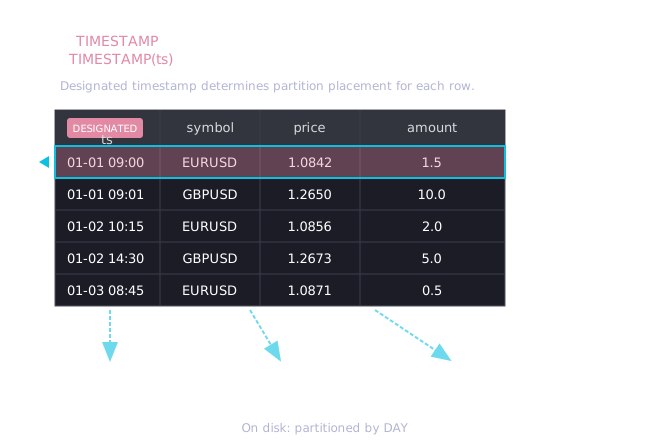
For example, with daily partitioning:
- A row with timestamp
2024-01-15T10:30:00Zgoes to the2024-01-15partition - A row with timestamp
2024-01-16T08:00:00Zgoes to the2024-01-16partition
This physical separation allows QuestDB to skip entire partitions during queries.
Interval scan optimization
When you query with a time filter on the designated timestamp, QuestDB performs an interval scan instead of a full table scan:
- Partition pruning: Skip partitions entirely outside the time range
- Binary search: Within relevant partitions, use binary search to find the exact start and end positions
- Sequential read: Read only the rows within the boundaries
-- This query on a 1-year table with daily partitions:
SELECT * FROM trades
WHERE timestamp > '2024-01-15' AND timestamp < '2024-01-16';

-- Skips 364 partitions, binary searches within 1 partition
-- Reads only matching rows, not the entire table
Use EXPLAIN to verify interval scans:
EXPLAIN SELECT * FROM trades WHERE timestamp IN '2024-01-15';
| QUERY PLAN                                                    |
|---------------------------------------------------------------|
| DataFrame                                                     |
|     Row forward scan                                          |
|     Interval forward scan on: trades                          |  ← Interval scan!
|       intervals: [("2024-01-15T00:00:00.000000Z",             |
|                    "2024-01-15T23:59:59.999999Z")]            |
If you see Async Filter or Table scan instead of Interval forward scan,
the query is not using the designated timestamp optimization.
What it enables
The designated timestamp unlocks these features:
Query features:
| Feature | Why it needs designated timestamp |
|---|---|
| SAMPLE BY | Aggregates by time buckets on sorted data |
| LATEST ON | Finds most recent rows using sorted order |
| ASOF JOIN | Matches rows by nearest timestamp |
| WINDOW JOIN | Time-windowed joins between tables |
| Interval scan | Binary search on sorted data for time-range queries |
Storage and lifecycle:
| Feature | Why it needs designated timestamp |
|---|---|
| Partitioning | Routes rows to time-based partitions |
| TTL | Drops partitions by age (requires partitioning) |
| Deduplication | Leverages sorted order to find overlapping timestamps for efficient upsert |
| Materialized views | SAMPLE BY-based views inherit the requirement |
| Replication | Requires WAL, which requires partitioning |
Without a designated timestamp
Tables without a designated timestamp lose all of the above. They are appropriate only for temporary tables during data manipulation.
| Capability | Without designated timestamp |
|---|---|
| Time-range queries | Must load entire projection into RAM |
| Partitioning | Not available — single partition |
| Tiered storage | Not available |
| Replication | Not available |
| ILP ingestion | HTTP ILP protocol cannot be used |
Exception: Static lookup tables (country codes, currency mappings) with no time dimension don't need a designated timestamp.
How to set it
At table creation (recommended)
Use the TIMESTAMP(columnName) clause:
CREATE TABLE trades (
    ts TIMESTAMP,
    symbol SYMBOL,
    price DOUBLE,
    amount DOUBLE
) TIMESTAMP(ts) PARTITION BY DAY;
The designated timestamp column must be defined in the column list before being
referenced in the TIMESTAMP() clause.
Via InfluxDB Line Protocol
Tables created automatically via ILP include a timestamp column as the
designated timestamp, partitioned by day by default:
trades,symbol=BTC-USD price=50000,amount=1.5 1234567890000000000
        └── Creates table with designated timestamp automatically
On query results (dynamic timestamp)
For queries that lose the designated timestamp (see
Troubleshooting), use the TIMESTAMP() keyword to restore it:
SELECT * FROM (
    SELECT ts, symbol, price FROM trades
    UNION ALL
    SELECT ts, symbol, price FROM trades_archive
    ORDER BY ts
) TIMESTAMP(ts);
Dynamic TIMESTAMP() only works if the data is actually sorted by that column.
If the data is not in order, query results will be incorrect. Always include
ORDER BY before applying TIMESTAMP() on potentially unordered data.
Properties
| Property | Value |
|---|---|
| Eligible column types | TIMESTAMP (microseconds) or TIMESTAMP_NS (nanoseconds) |
| Columns per table | Exactly one (or none) |
| NULL values | Not allowed |
| Mutability | Cannot be changed after table creation |
| Updatability | Cannot be modified with UPDATE |
Timestamp resolution
QuestDB supports two timestamp resolutions:
| Type | Resolution | Precision | Use case |
|---|---|---|---|
TIMESTAMP | microseconds | 10⁻⁶ s | Most applications |
TIMESTAMP_NS | nanoseconds | 10⁻⁹ s | High-frequency trading, scientific data |
Use TIMESTAMP unless you specifically need nanosecond precision. Both
types work identically with all time-series features.
For more on timestamp handling, see Timestamps and time zones.
Limitations
Cannot be changed after table creation
The designated timestamp is set at CREATE TABLE and cannot be altered. To use
a different column:
-- 1. Create new table with correct designated timestamp
CREATE TABLE trades_new (
    event_time TIMESTAMP,  -- new designated timestamp
    ingest_time TIMESTAMP,
    symbol SYMBOL,
    price DOUBLE
) TIMESTAMP(event_time) PARTITION BY DAY;

-- 2. Copy data (will be reordered by new designated timestamp)
INSERT INTO trades_new
SELECT event_time, ingest_time, symbol, price
FROM trades
ORDER BY event_time;

-- 3. Swap tables
DROP TABLE trades;
RENAME TABLE trades_new TO trades;
For large tables (billions of rows), this migration can take significant time and disk space. Plan for:
- Sufficient disk space for both tables temporarily
- Application downtime or dual-write period
- Data validation after migration
Cannot be NULL
Every row must have a valid timestamp value. The designated timestamp column cannot contain NULL.
If your source data has missing timestamps:
- Filter out NULL rows before inserting
- Use a default/sentinel value (e.g.,
'1970-01-01T00:00:00Z') - Use a different column as designated timestamp
Cannot be updated
The designated timestamp column cannot be modified with UPDATE:
-- This will fail:
UPDATE trades SET ts = '2024-01-15T12:00:00Z' WHERE symbol = 'BTC-USD';
-- Error: Designated timestamp column cannot be updated
Why? Updating the timestamp would require reordering rows within the partition and potentially moving rows between partitions. This would break QuestDB's append-optimized storage model.
Workaround: Copy data to a temp table, modify it, and re-insert:
-- 1. Create temp table WITHOUT designated timestamp
--    Copy the partition(s) containing rows you need to modify
CREATE TABLE trades_temp AS (
    SELECT * FROM trades
    WHERE ts IN '2024-01-15'
);

-- 2. Drop the partition from the source table
ALTER TABLE trades DROP PARTITION LIST '2024-01-15';

-- 3. Update timestamps freely in the temp table (no designated timestamp)
UPDATE trades_temp
SET ts = dateadd('h', 1, ts)
WHERE symbol = 'BTC-USD';

-- 4. Re-insert into main table (data will be sorted automatically)
INSERT INTO trades SELECT * FROM trades_temp;

-- 5. Clean up
DROP TABLE trades_temp;
For ongoing correction workflows where you expect duplicate keys, consider using deduplication with UPSERT KEYS instead.
Only one designated timestamp per table
A table can have multiple TIMESTAMP columns, but only one can be the
designated timestamp:
CREATE TABLE orders (
    exchange_ts TIMESTAMP,     -- designated timestamp (when exchange received)
    gateway_ts TIMESTAMP,      -- when our gateway received
    ack_ts TIMESTAMP,          -- when exchange acknowledged
    symbol SYMBOL,
    side SYMBOL,
    qty DOUBLE
) TIMESTAMP(exchange_ts) PARTITION BY DAY;
Choose the column you'll filter by most often in WHERE clauses.
Best practices
Choosing the right column
If your data has multiple timestamp columns:
| Column type | Example | Recommended? |
|---|---|---|
| Event time | When the trade executed | ✅ Best choice |
| Ingestion time | When QuestDB received it | ⚠️ Only if event time unavailable |
| Processing time | When downstream system handled it | ❌ Rarely appropriate |
Rule of thumb: Choose the timestamp that:
- You'll filter by most often in queries
- Represents the actual time of the event
- Has the most uniform distribution
Common concerns
Duplicate timestamps: Duplicate timestamp values are allowed. Multiple rows can have the same designated timestamp. If you need uniqueness, enable deduplication with UPSERT KEYS.
Future timestamps and TTL: If you use TTL for automatic data retention, be careful with future timestamps. By default, TTL uses wall-clock time as the reference to prevent accidental data loss from far-future timestamps. See the TTL documentation for details.
Timezones: All timestamps are stored in UTC internally. When you query with
a timezone (e.g., SAMPLE BY 1d ALIGN TO CALENDAR TIME ZONE 'Europe/London'),
QuestDB converts from the specified timezone to UTC for the search, then
converts results back. Your source data should ideally be in UTC; if not,
use to_utc() during ingestion.
Multiple timestamp columns
Keep additional timestamps as regular columns:
CREATE TABLE quotes (
    exchange_ts TIMESTAMP,     -- when exchange published (designated)
    received_ts TIMESTAMP,     -- when we received it
    symbol SYMBOL,
    bid DOUBLE,
    ask DOUBLE
) TIMESTAMP(exchange_ts) PARTITION BY DAY;

-- Query by exchange time (uses interval scan):
SELECT * FROM quotes
WHERE exchange_ts > dateadd('h', -1, now());

-- Query by received time (full scan, but still works):
SELECT * FROM quotes
WHERE received_ts > dateadd('h', -1, now());
Out-of-order data
QuestDB handles out-of-order data automatically—no special configuration needed. Data arriving out of order is merged into the correct position.
However, excessive out-of-order data increases write amplification. If most of your data arrives significantly out of order:
- Consider using ingestion time as designated timestamp
- Store event time as a separate indexed column
- Use appropriate partition sizing (smaller partitions = less rewrite per out-of-order event)
Partition size alignment
Match your partition interval to your designated timestamp's data distribution:
| Data volume | Partition interval |
|---|---|
| < 100K rows/day | MONTH or YEAR |
| 100K - 10M rows/day | DAY |
| 10M - 100M rows/day | HOUR |
| > 100M rows/day | HOUR |
See Partitions for detailed guidance.
Troubleshooting
Certain SQL operations produce results without a designated timestamp. This breaks time-series features like SAMPLE BY on the result set.
Operations that lose designated timestamp
| Operation | Why | Solution |
|---|---|---|
UNION / UNION ALL | Combined results aren't guaranteed ordered | ORDER BY then TIMESTAMP() |
| Subqueries | Derived tables lose table metadata | Apply TIMESTAMP() to subquery |
read_parquet() | External files have no QuestDB metadata | ORDER BY then TIMESTAMP() |
| Type casting | ts::STRING::TIMESTAMP loses designation | Avoid round-trip casting |
| Some expressions | Computed timestamps aren't designated | Use TIMESTAMP() on result |
How to restore it
Use the TIMESTAMP() keyword on ordered data:
-- UNION loses designated timestamp
-- Solution: ORDER BY, then apply TIMESTAMP()
SELECT * FROM (
    SELECT ts, symbol, price FROM trades_2023
    UNION ALL
    SELECT ts, symbol, price FROM trades_2024
    ORDER BY ts
) TIMESTAMP(ts)
SAMPLE BY 1h;
-- Parquet files have no designated timestamp
-- Solution: ORDER BY, then apply TIMESTAMP()
SELECT timestamp, avg(price)
FROM (
    (SELECT * FROM read_parquet('trades.parquet') ORDER BY timestamp)
    TIMESTAMP(timestamp)
)
SAMPLE BY 1m;
-- Subquery loses designated timestamp
-- Solution: Apply TIMESTAMP() to the subquery result
WITH recent AS (
    (SELECT * FROM trades WHERE timestamp > dateadd('d', -7, now()))
    TIMESTAMP(timestamp)
)
SELECT * FROM recent SAMPLE BY 1h;
Verifying designated timestamp
Check if a table has a designated timestamp:
SELECT table_name, designatedTimestamp
FROM tables()
WHERE table_name = 'trades';
| table_name | designatedTimestamp |
|---|---|
| trades | ts |
Check column details:
SELECT "column", type, designated
FROM table_columns('trades');
| column | type | designated |
|---|---|---|
| ts | TIMESTAMP | true |
| symbol | SYMBOL | false |
| price | DOUBLE | false |
Check if a query uses interval scan optimization:
EXPLAIN SELECT * FROM trades WHERE timestamp IN '2024-01-15';
Look for Interval forward scan—if you see Async Filter instead, the
designated timestamp optimization isn't being used.
FAQ
Can I add a designated timestamp to an existing table?
No. The designated timestamp must be defined at table creation. To add one, create a new table with the designated timestamp and migrate your data.
What happens if I insert data with NULL timestamp?
The insert fails. The designated timestamp column cannot contain NULL values.
Can I have two designated timestamps?
No. Each table can have at most one designated timestamp. Use additional
TIMESTAMP columns for other time values.
Does out-of-order data break anything?
No. QuestDB handles out-of-order data automatically by merging it into the correct sorted position. However, excessive out-of-order data increases write amplification.
Is designated timestamp the same as a primary key?
No. The designated timestamp:
- Doesn't enforce uniqueness (use deduplication for that)
- Determines physical storage order
- Cannot be updated
- Is optional (though strongly recommended)
Why can't I UPDATE the designated timestamp?
Updating the timestamp would require reordering rows and potentially moving them between partitions, breaking QuestDB's append-optimized storage model. Delete and re-insert instead, or use deduplication for correction workflows.
See also
- CREATE TABLE — Full syntax for table creation
- Partitions — Time-based data organization
- Interval scan — Query optimization details
- TICK intervals — Complex temporal patterns in a single expression
- SAMPLE BY — Time-based aggregation
- LATEST ON — Finding most recent records
- Timestamps and time zones — Working with time values