Time Partitions
QuestDB partitions tables by time intervals, storing each interval's data in a separate directory. This physical separation is fundamental to time-series performance - it allows the database to skip irrelevant time ranges entirely during queries and enables efficient data lifecycle management.
Why partition
Partitioning provides significant benefits for time-series workloads:
- Query performance: The SQL optimizer skips partitions outside your query's time range. A query for "last hour" on a table with years of data reads only one partition, not the entire table.
- Data lifecycle: Drop old data instantly with DROP PARTITION - no expensive DELETE operations. Detach partitions to cold storage, reattach when needed.
- Write efficiency: Out-of-order data only rewrites affected partitions, not the entire table. Smaller partitions mean less write amplification.
- Concurrent access: Different partitions can be written and read simultaneously without contention.
How partitions work
Partitioning requires a designated timestamp column. QuestDB uses this timestamp to determine which partition stores each row.
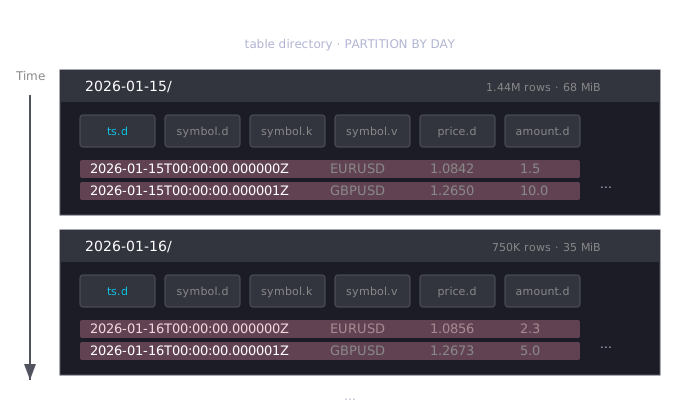
Each partition is a directory on disk named by its time interval. Inside, each
column is stored as a separate file (.d for data, plus index files for
SYMBOL columns).
Choosing a partition interval
Available intervals: HOUR, DAY, WEEK, MONTH, YEAR, or NONE.
Target 30-80 million rows per partition for tables with average-sized rows. Tables with many columns should aim for the lower end; tables with few columns can go higher.
Choose your interval based on how much data you ingest:
| Your data volume | Recommended interval |
|---|---|
| >1 billion rows/day | HOUR |
| 30-500 million rows/day | DAY |
| 5-30 million rows/day | WEEK |
| 1-5 million rows/day | MONTH |
| <1 million rows/day | YEAR |
Why this matters:
- Too many small partitions increases syscall overhead. Each partition is a directory, and operations like queries and compaction must interact with many filesystem objects.
- Too few large partitions can hurt out-of-order write performance. When late data arrives, QuestDB may need to rewrite portions of the partition. Smaller partitions limit how much data gets rewritten in worst-case scenarios.
Other considerations:
- Match your most common query patterns (if you typically query by day,
DAYpartitions align well) - You can change partitioning later, but it requires recreating the table
For ILP (InfluxDB Line Protocol) ingestion, the default is DAY. Change it via
line.default.partition.by in server.conf.
Creating partitioned tables
Specify partitioning at table creation:
CREATE TABLE trades (
    ts TIMESTAMP,
    symbol SYMBOL,
    price DOUBLE,
    amount DOUBLE
) TIMESTAMP(ts) PARTITION BY DAY;
Default behavior by creation method
| Creation method | Default partition |
|---|---|
SQL CREATE TABLE (no PARTITION BY) | NONE |
SQL CREATE TABLE (with PARTITION BY) | As specified |
| ILP auto-created tables | DAY |
Partition directory naming
| Interval | Directory format | Example |
|---|---|---|
HOUR | YYYY-MM-DDTHH | 2026-01-15T09 |
DAY | YYYY-MM-DD | 2026-01-15 |
WEEK | YYYY-Www | 2026-W03 |
MONTH | YYYY-MM | 2026-01 |
YEAR | YYYY | 2026 |
Inspecting partitions
Use SHOW PARTITIONS or the table_partitions() function:
SHOW PARTITIONS FROM trades;
| index | partitionBy | name | minTimestamp | maxTimestamp | numRows | diskSizeHuman |
|---|---|---|---|---|---|---|
| 0 | DAY | 2026-01-15 | 2026-01-15T00:00:00Z | 2026-01-15T23:59:59Z | 1440000 | 68.0 MiB |
| 1 | DAY | 2026-01-16 | 2026-01-16T00:00:00Z | 2026-01-16T12:30:00Z | 750000 | 35.2 MiB |
The table_partitions() function returns the same data and can be used in
queries with WHERE, JOIN, or UNION:
SELECT name, numRows, diskSizeHuman
FROM table_partitions('trades')
WHERE numRows > 1000000;
Storage on disk
A partitioned table's directory structure:
db/trades/
├── 2026-01-15/           # Partition directory
│   ├── ts.d              # Timestamp column data
│   ├── symbol.d          # Symbol column data
│   ├── symbol.k          # Symbol column index
│   ├── symbol.v          # Symbol column values
│   ├── price.d           # Price column data
│   └── amount.d          # Amount column data
├── 2026-01-16/
│   ├── ts.d
│   ├── ...
└── _txn                  # Transaction metadata
Partition splitting and squashing
When out-of-order data arrives for an existing partition, QuestDB may split that partition to avoid rewriting all its data. This is an optimization for write performance.
A split occurs when:
- The existing partition prefix is larger than the new data plus suffix
- The prefix exceeds
cairo.o3.partition.split.min.size(default: 50MB)
Split partitions appear with timestamp suffixes in SHOW PARTITIONS:
| name | numRows |
|---|---|
| 2026-01-15 | 1259999 |
| 2026-01-15T205959-880001 | 60002 |
QuestDB automatically squashes splits:
- Non-active partitions: squashed at end of each commit
- Active (latest) partition: squashed when splits exceed
cairo.o3.last.partition.max.splits(default: 20)
To manually squash all splits:
ALTER TABLE trades SQUASH PARTITIONS;
Partition operations (ATTACH, DETACH, DROP) treat all splits of a
partition as a single unit.
See also
- Designated timestamp — Required for partitioning
- DROP PARTITION — Remove old partitions
- DETACH PARTITION — Move to cold storage
- ATTACH PARTITION — Restore detached data
- TTL — Automatic partition cleanup by age